Showing posts with label Hacking. Show all posts

Wednesday, January 20, 2016

Hacking the Z-Wave Protocol with a Hack-RF

More cool stuff for home automation and hacking:

I've been doing a lot with using rtl_433 and an rtl-sdr to receive temperature and humidity sensors, outdoor weather stations, and security system sensors (aka contacts).

So, I've been wondering about receiving and decoding home automation RF protocols like Z-Wave, Insteon, Zigbee which aren't terribly open.  The other day I saw this article on the RTL-SDR.com blog, "Hacking the Z-Wave Protocol with a Hack-RF", about a Shmoocon talk.  Exactly what I've been waiting for.  I have a HackRF in that I haven't been doing much with ... yet.

I assumed it would be possible to receive Z-Wave with an RTL-SDR.   There are a number of USB Z-Wave sticks that are starting to get popular.  Many home automation controllers that have one of the protocols implemented are fairly expensive and somewhat closed.

So I'm excited to see this, quoting the RTL-SDR.com post

Z-wave is a wireless protocol that is used often in applications like smart home and industrial automation. It essentially allows various wireless nodes to connect and talk to one another within your house, using 900 MHz wireless technology. Some common examples of Z-wave node products might be wireless controlled lights, door locks, thermostats and other security devices like motion detectors.

Recently at Shmoocon 2016 (a yearly hacking and security themed conference), presenters Joseph Hall and Ben Ramsey showed how they were able to use a HackRF software defined radio and some GNU Radio based software to not only sniff Z-wave packets, but to also control Z-wave devices. What’s also interesting is that they found that encryption on z-wave devices was rarely enabled, except for five out of nine door locks that they tested where it was enabled by default.

See the full story at Hackaday and have a look at their code on GitHub.
Unfortunately it looks like their stuff requires two HackRFs, one for transmitting and one for receiving. I unfortunately, only have one HackRF. There has been some work to enable better T/R (Transmit/Receive) switching into the HackRF libraries. I've seen the commits go by but haven't looked into them much yet.

Things are getting interesting, stay tuned for more...

Links:


Reverse Engineering Cheap Chinese Radio Firmware TyTera MD-380 (Shmoocon 2016 via Hackaday)

Cool Stuff:

For those who are interested in the intersection of microcontrollers, hacking, and radio, an interesting deep dive into the firmware of one of the Chinese DMR/mototrbo ($140) radios, the Tytera MD380.

Unlike the cheap analog Chinese radios (Wouxun, Baofeng) which can only be programmed once, this radio supports a firmware upgrade.  The bit that is interesting for people who aren't deep into digital electronics is that this hack produced a version of the firmware that turns the MD380 into the first (hardware) DMR scanner.  N2NOV has been pointing out the gap, that no scanners cover DMR for a while now.

Note: this exploration/hack is at the experimental stage, so I wouldn't consider this ready/usable/applicable to anyone but those that want to experiment and are willing to risk bricking their radio or worse.

I couldn't resist, so I ordered a Tytera MD-380 this morning. More details to come.  So now my To Do list includes, learning about DMR/MotoTRBO, programming NYC area DMR amateur radio repeaters, and finding/joining communities that are covering alternative firmware development for the MD-380.

Out of the box, this radio is supposed to allow field programming (aka front panel programming) of DMR talkgroups.

Travis GoodSpeed's github repo, has a package of command-line Python tools for the MD380. Looks like enough for reading and writing the radio on Linux and Mac OS.  Also there is the beginnings of a CHiRP driver for the MD380. It doesn't read/write the radio but can be used for maintaining the analog channels and banks.

Also, hack-a-day, has had some good radio articles lately that aren't that deep into digital electronics for a wider audience.

You might recognize the name Travis Goodspeed from other projects like the GoodFET, an open source JTAG adapter inspired by Dangerous Prototype's Bus Pirate.

Links:


Friday, January 15, 2016

More Yaesu VX-8 GPS implementation details.

4Z7DTF left a comment on my post "Another Yaesu VX-8DR external GPS with an Arduino/..." to let me know about his VX-8 Arduino GPS project on github.

There have been a number of projects that use either an Arduino or bare ATtmega microcontroller to turn the GPS module's NMEA sentences back into the a format the brain dead parser built into the VX-8's firmware can handle.

He has done some additional testing, actually fuzzing, showing the VX-8's parser does no error checking what so ever. 

Also, another interesting bit, in his work, he noted there is no need for the communication to be bi-directional. I don't know what, if anything the VX-8 tries to send to the GPS module, but it appears to be unnecessary. 

What is interesting about that is the microcontroller then really only needs a single serial port.  Most of the other projects are bi-directional using a software UART emulation for the second port.   So it might be possible to implement this project with something much smaller and even lower power.   It would be interesting to see if this can be done with the ATTiny85, using something like the Adafruit 3.3V trinket.  That is supposed to draw around 9 milliAmps at 8 Mhz, but 3 mA of that is just for the green power LED!  The ATTiny has no built in UART, so it would be all software serial. 


Saturday, November 28, 2015

Acurite 592TXR Temperature and Humidity Sensors now decoded by rtl_433.

I've added decoding of Acurite's 592TXR "Tower" temperature and humidity sensors to rtl_433. These are small, inexpensive, wirelesss (433 Mhz), temperature and humidity sensors. The 592TXR has several different model numbers including 06002RM

These are compatible with Acurite's consoles such as the 01512 that I have as well as Acurite's Acu-Link Internet bridge which posts to acu-link's web page as well as weatherunderground. I picked up the Acurite 5-n-1 Weather Station, a console, and the internet bridge because the support for the 5-n-1 had been added to rtl_433 and the package price was pretty reasonable.
There were a number of people interested in decoding the 592TXR, but for some reason, it never got added, so I finally added it and cleaned up the Acurite 5-n-1 weather station decoding. The pull request got merged November 8th, 2015.

I think the temperature only version, the 592TX, should also be supported but I don't have one to test. Please let me know if it decodes successfully or not.

The protocol used by the Acurite 592TXR and the 5-n-1 weather station are very similar. The weather station's messages are one byte longer, but they are basically the same with the same RF signaling characteristics.


Saturday, March 29, 2014

Cool Technology: IPython Notebooks

I may be very late to the party but I've recently discovered IPython notebooks.  IPython is an extremely useful Python shell environment that has been kicking around for 10+ years. Initially the number of advantages it offered over the built-in python shell was small.  But then again it started out as a couple of hundred line hack.  So back then it seemed like it wasn't worth the trouble to make sure it was install on all the machines you might hack Python on.

Fast forward to 2010 or so, IPython has reached a 1.0 milestone, and has evolved significantly to an extremely powerful platform.  However the aspect that I find the most useful is notebooks that display in a web browser.   It's supposed to be somewhat reminiscent of Mathematica which I've never used.

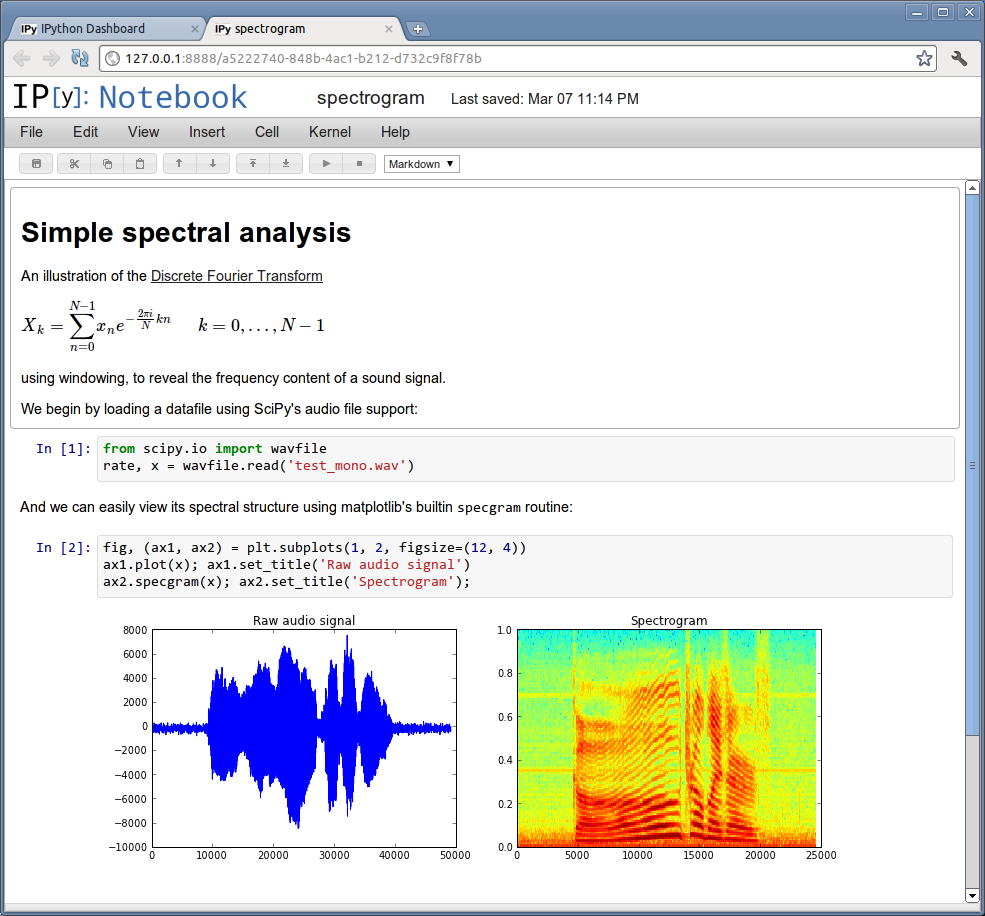
Notebooks contain blocks of executable Python code and their output.  The Python code can be edited and run/rerun right there from the browser.  But where it really gets interesting is that rich multimedia stuff, especially graphs can be displayed right there, in-line.  It's pretty enabling for scientific computing, enabling very short hacking and visualization cycles almost like a spreadsheet.

I really should write a lot more about this.  It's not just for Python, and it's not just for the web, it seems like it could be a big thing.  It should also make teaching and learning a lot easier.

Check out:
I really like this example, reading a .WAV file and showing side by side plots of amplitude and spectrum:


There are a few things that I think could use improvement.
  1. More Document Structure, Real Head 1, 2, 3 and Table of Contents.   I'm a big fan of Mediawiki's nice native built-in structure.  It really helps organize documents in my opinion.  It's also one of the biggest things lacking from Evernote (IMHO).
  2. Native Tabular output widgets.  There are some extensions but they aren't quite there yet.  This could make an awesome SQL Workbench, but it could really use ways of presenting and working with tables as output cells.
Enjoy.

Thursday, January 2, 2014

Rigol DS1052E/DS1102 and Linux, Python, usbtmc

[To Be Updated]
This is one of those intersections of electronics, open source, hacking, and programming that really gets my interest.

Here are some links with information on connecting the Rigol scope to Linux, and controlling it using Python via USB.  The scope implements the USB test and measurement class, usbtmc.

Thursday, August 8, 2013

Yaesu FT-857D Crashes (reboot loop) after programming a 4 character channel label with CHiRP

I found a small latent problem in the Yaesu FT-857D firmware which could cause the radio to crash and go into a reboot loop when a 4 character or less label was created using the free CHiRP radio programming software. I isolated the problem, the Yaesu FT-8[59]7 driver in CHiRP now works around the problem starting with daily builds around June 27th, 2013.

This blog post just archives the info in case someone else stumbles across the problem either by using an outdated version of CHiRP or writing their own software for manipulating the Yaesu FT-8[59]7 memory. This probably applies to the FT-897(d) as well.

The problem has to do with how the 8 character memory label is padded.  The older versions of CHiRP were padding unused characters with 0xFF.  An unused memory label defaults to eight bytes of 0xFF on the radio.   When a label is created for a memory (channel) on the radio, it is set to 'CH-NNN  '.  There is no way that I found, from the radio to create a memory label that wasn't space padded.  Padding with 0xFF for labels that are 5 characters or more doesn't seem to cause any issues. The corrected version of CHiRP now space pads the label out to 8 characters.  I believe G4HFQ's FTbasicMMO, only space pads as well.

Marco Filippi, IZ3GME the primary author of the FT-8[59]7 driver made the change within hours of me reporting the problem.  The very next CHiRP build had the fixed version of the driver.  The current release of CHiRP, 0.3.1 from April 2013, has the old driver.  Until a version later than 0.3.1 is released, you need to download a daily release.

I believe I'm justified in calling this a small bug in the Yaesu firmware, because when the radio accesses the memory with the 0xFF padded label, it goes into a continual reboot cycle with lots of clicking of relays and a beep each time it restarts.  From the radio itself, the only way to resolve this is to force a reset which will clear some of the settings and/or memory entries depending upon which reset is used.  My opinion is the radio's firmware should be a little more forgiving than this.

Note: if your Yaesu FT-857/897 ever does get stuck in a crash/reboot loop, you can still get into clone mode, and save a copy of the whole set of radio settings and memories before you reset it. 

Another thing I learned about the FT-857/FT-897 firmware during all of this is that it is nearly impossible to get a pristine memory image from the radio.  The radio has three different types of resets which will clear all memories, some settings, and a "full microprocessor reset" which is supposed to return the radio to all factory settings.  However, the way this is implemented, the eeprom isn't really reset to a known default, just select bits are cleared marking all of the memory entries unused.  Most of the previous memory channel settings, including the label are still there, which makes things confusing if you were looking for clear, reproduceable state.

(Note: There probably is a way to completely clean the EEPROM to a known, reproduceable state, but you don't want to use it.   For some reason, Yaesu's firmware writers included a CAT command which would completely reset the radio including the specific calibration settings that are written into EEPROM for each radio.   Unforatunely, it's not that improbable to accidentally trigger this when using the CAT interface a lot, possibly with a baud rate setting mismatch.  Every FT-8[59]7 owner should use the service menu to record all of the calibration settings in case they are ever lost.  This has been documented on the FT-857 and FT-897 Yahoo group's.   There is also a few pieces of software, including a PERL script from 0xdecafbad.com for reading out the calibration settings over the CAT interface using the undocumented CAT peek command.

Hopefully I'll get around to posting and documenting more of the things I've learned about the FT-857d.  All of the information is out there, but not necessarily organized to make it easy to find.

References

Monday, April 9, 2012

Interfacing Radios to computer sound cards.

A question that frequently comes up on some of the various radio mailing lists I'm on is how to interface the radio to a computer for doing digital modes via the sound card. The sound card provides the equivalent of a modem, doing digital to analog and analog to digital conversion.

Skip Tellar, KH6TY, has a design called DigiVOX that was in the March 2011 QST for sound card interfacing. It will do a VOX function for activating the Push-To-Talk for doing digital modes without using any additional signaling lines.


Mark Phillips, NI2O, sells a kit called USB Digivox that combines a USB sound
card and KH6TY's digiVOX interface at his Go Box Gizmos site. This simplifies the setup and gives a dedicated sound card for the radio analog to digital and vice-versa.


Argent Data systems is a good source for a microphone/speaker cable for connecting to Kenwood, Wouxun, Puxing, and other chinese radios that emulate the Kenwood.


The software that is the most popular for doing sound card digital modes is FLdigi by W1HKJ. It can do quite a few different modes and is cross platform. It's got a lot of functionality and though has a bit of a learning curve. Fortunately there are a lot of tutorials out there on how to use FLdigi.


Note: Laptops often have a MIC input connector and not a line level input. On the ring of the MIC connector is 2-5V for biasing the microphone element. You want to take care with this, I'd at least make sure to put a capacitor to block the DC or make no connection to that side. If I remember correctly it corresponds to the Right (Red) channel.