Saturday, March 29, 2014

Cool Technology: IPython Notebooks

I may be very late to the party but I've recently discovered IPython notebooks.  IPython is an extremely useful Python shell environment that has been kicking around for 10+ years. Initially the number of advantages it offered over the built-in python shell was small.  But then again it started out as a couple of hundred line hack.  So back then it seemed like it wasn't worth the trouble to make sure it was install on all the machines you might hack Python on.

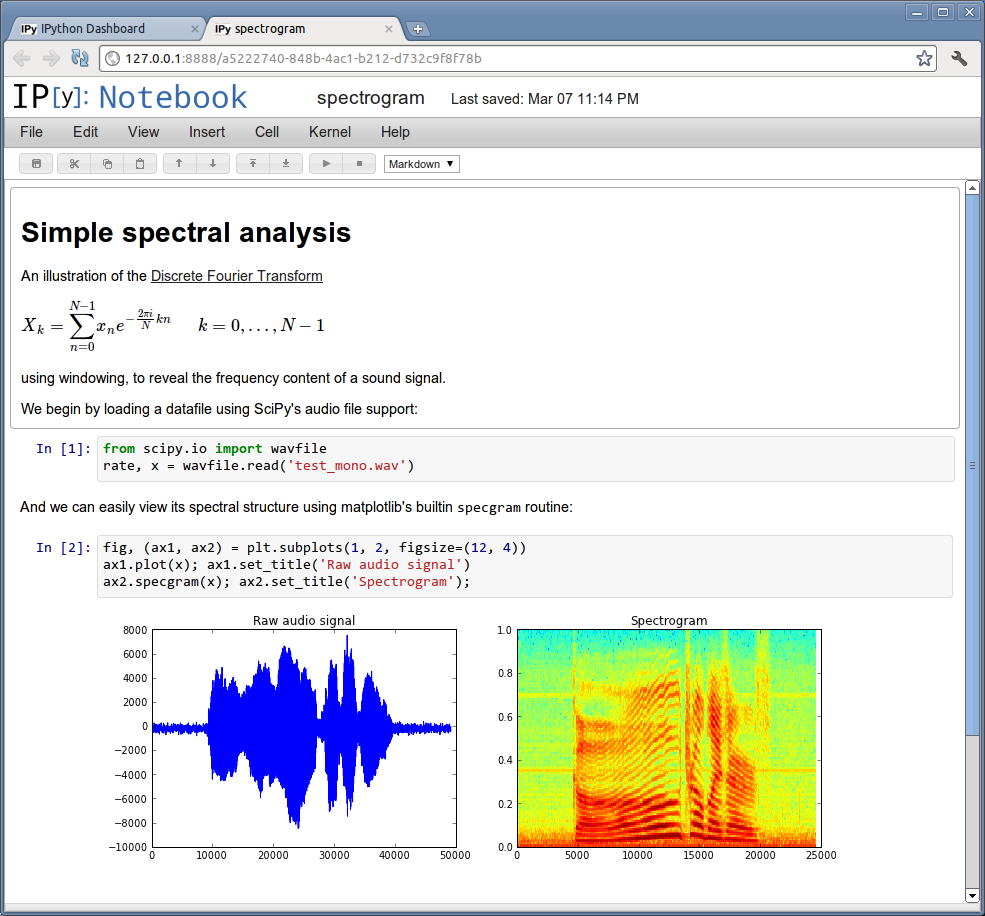
Fast forward to 2010 or so, IPython has reached a 1.0 milestone, and has evolved significantly to an extremely powerful platform.  However the aspect that I find the most useful is notebooks that display in a web browser.   It's supposed to be somewhat reminiscent of Mathematica which I've never used.

Notebooks contain blocks of executable Python code and their output.  The Python code can be edited and run/rerun right there from the browser.  But where it really gets interesting is that rich multimedia stuff, especially graphs can be displayed right there, in-line.  It's pretty enabling for scientific computing, enabling very short hacking and visualization cycles almost like a spreadsheet.

I really should write a lot more about this.  It's not just for Python, and it's not just for the web, it seems like it could be a big thing.  It should also make teaching and learning a lot easier.

Check out:
I really like this example, reading a .WAV file and showing side by side plots of amplitude and spectrum:


There are a few things that I think could use improvement.
  1. More Document Structure, Real Head 1, 2, 3 and Table of Contents.   I'm a big fan of Mediawiki's nice native built-in structure.  It really helps organize documents in my opinion.  It's also one of the biggest things lacking from Evernote (IMHO).
  2. Native Tabular output widgets.  There are some extensions but they aren't quite there yet.  This could make an awesome SQL Workbench, but it could really use ways of presenting and working with tables as output cells.
Enjoy.

What is a dB, dBm, dBu, dBc, (Tutorial Videos from W2AEW on Youtube)

If the concept of decibels (dB) is confusing, this Youtube video from W2AEW has a very clear explanation with a demonstration using a spectrum analyzer:

https://www.youtube.com/watch?v=1mulRI-EZ80#aid=P-LGfIJuuH8

Remember: dB is a ratio of Power levels, so when you need to do a ratio of Voltages, the formula is different.  He doesn't mention that until late in the video.  However, he gives a much clearer explanation of why the formula is different (20 x Log10() vs 10 x Log10()) by doing the
math to demonstrate where the difference comes from.

(Remember P=I x E or P = (V^2)/R ?)

There is a table at the beginning of the video of the few things you should memorize both for your amateur radio test and for general use later:

  • 3 dB represents a ratio that is a doubling.  Of the two things being compared, one has twice as much power as the reference.
  • -3 dB represents a ratio that is a half.
  • 10 dB is 10 times greater.
  • 20 dB is 100 times greater.

Note: W2AEW has posted a whole bunch of good video tutorials on electronics and radio.
https://www.youtube.com/user/w2aew

A couple that might be relevant to prepping for your General Class amateur radio exam:

I've also found his oscilloscope and spectrum analyzer tutorials to be very useful.  He's very good at explaining and documenting things.  Compared to a normal text presentation, the demonstrations / experiments really drive the concepts home and show that it's possible to try these things for yourself.

Enjoy.


Wednesday, February 26, 2014

Vodafone mobile network in a back pack - "Go Kits" for restoring communications

From Engadget - Vodafone's network in a backpack connects people after natural disasters:

This story has a couple of interesting points to Amateur Radio people who have been building go kits to provide communications when there is no infrastructure for several decages now.

This mobile phone carrier has two types of Go kits (one 220 lbs, and now a 24 lb backpack) that they can deploy to disaster areas to provide communications services.

The backpack has "2G GSM connection capable of handling thousands of text messages and five calls made at once to people within a 328-foot radius. It's equipped with a GSM base transceiver that uses satellite connection to link up to a host network."

(Note: Thousands of text messages vs. 5 simultaneous voice calls.  So it's important to educate people that text messaging has a much better chance of getting through during times of network issues whether it's congestion or outages.  People will eventually figure this out, but may loose valuable time and/or battery power.)

Details on larger version:  "In fact, during Vodafone's mission to the Philippines following Typhoon Haiyan, two 220-pound kits handled a total of 1.4 million text messages and 443,288 calls within 29 days. Obviously, the larger machine has a wider operating radius (3 miles), but the Mini has its own set of pros. Since it can be deployed within minutes and be carried on planes, it can potentially help more people -- and more quickly, too."

This implies that the 220 lb kit can't be carried on a plane, which sounds like a serious limiting factor for deployment. Possibly it's just due to the reporting in the story. 220 lbs is not a problem weight wise. So perhaps actual size, batteries, or the inclusion of generator keeps it from going on planes.


http://www.engadget.com/2014/02/25/vodafone-instant-network-mini-backpack/


Tuesday, February 18, 2014

"encyclopedia" of digital modes (modulation/encoding)

This looks like it could be very useful for those interested in decoding or understanding various digital modes, how they are encoded/modulated.

The web site is: http://www.frequencymanager.de/TH/th.html

There are print books for sale for HF modes and another for VHF/UHF. Roland Proesch is the author. (The books are available in german and english)

For each book a PDF except is available for free that still has lots of helpful information in it.

In addition to a brief description for each signal are a number of pictures of oscilloscope and sonogram/waterfall type views.

RTL-SDR users would find the VHF/UHF book directly relevant. However the HF book looks like it might provide a better foundation.

Take a look at
  • HF: (81 pages) - http://www.frequencymanager.de/TH/files/KurzfassungTechnicalHandbookHF2013E.pdf
  • VHF/UHF: (56 pages) - http://www.frequencymanager.de/TH/files/KurzfassungTechnicalHandbookVHF2013.pdf
Unfortunately, it doesn't look like he's selling the complete books in electronic form, only print. I came across this from a post to the digitalradio yahoo group by Ian Wade, G3NRW.

I've also forwarded this to rtl-sdr.com which I find is a very useful blog for SDR and digital modes.


Thursday, January 2, 2014

AUXFOG: Auxiliary Communications Field Operations Guide. (Free PDF)

FYI - Here's a free, handy reference guide to have around.  It's a version of the DHS "National Interoperability Field Operations Guide" (NIFOG) that has been adapted to be more appropriate for our uses.  It contains frequency information for many other radio services that you might want to have programmed in a scanner or radio with some available memories.  There is also some tutorial information including some antennas that can be easily constructed.

"The Auxiliary Communications Field Operations Guide (AUXFOG) is a reference for auxiliary communicators who directly support backup emergency communications for State/local public safety entities or for an amateur radio organization supporting public safety.

This reference guide contains information about AuxComm best practices, frequently used radio frequencies, Mutual Aid channels as well as tips and suggestions about auxiliary emergency communicators integrating into a NIMS ICS environment to support communications for planned events or incidents. It can serve as a reference both for auxiliary emergency communicators and public safety communications professionals. You can download the AUXFOG by clicking on the hyperlink to the left and save it to your own storage device. It will only download as a PDF.

While printed copies are not available from DHS, you may download an electronic copy to print as many hard copies as desired."

http://www.publicsafetytools.info/auxfog/start_auxfog_info.php

Trying Linux and amateur radio software without having to install it on your computer.

The topic of trying Linux without having to actually install it on your computer came up recently.   There are several "Live" distributions which can be downloaded to a bootable DVD or USB thumb drive. You can then boot your computer from the DVD or USB drive without having to touch the existing installation on your hard drive.

The simplest approach is to download the DVD .iso, burn it to a blank DVD, and then reboot your computer, telling it to boot from the DVD drive.

The USB thumb drive approach has more steps to create, but can be faster as well as allowing you to save changes between reboots.

Two ham radio oriented builds that have been mentioned:

Both are based on Ubuntu Linux and include software such as FLdigi and Chirp.

If you are interested in trying them, I think there are better tutorials available if you google "ubuntu live" than the instructions that accompany the two ham specific packages mentioned above.

Rigol DS1052E/DS1102 and Linux, Python, usbtmc

[To Be Updated]
This is one of those intersections of electronics, open source, hacking, and programming that really gets my interest.

Here are some links with information on connecting the Rigol scope to Linux, and controlling it using Python via USB.  The scope implements the USB test and measurement class, usbtmc.